If you've typed 'which AI should I use for my business' into a search engine recently, you're not alone. The number of AI tools available to small business owners has exploded — and so has the confusion. ChatGPT, Claude, Gemini, Perplexity, Grok, DeepSeek, Qwen, Mistral, Microsoft Copilot. They all claim to be the best. They all have free tiers. And they all look roughly the same until you actually try to use them for real work.
This guide cuts through the noise. We've tested and researched every major AI tool available to small business owners in 2026. We'll tell you what each one is actually good at, what it costs, who should use it, and — most importantly — which one is right for your specific situation.
Watch the Video Guide
Bottom line up front: For most small service businesses, start with ChatGPT ($20/month) for general tasks and Perplexity (free) for research. If you do heavy document work, swap ChatGPT for Claude. If your team runs on Google Workspace, use Gemini instead. That's the 80% answer.
Why This Decision Matters More Than You Think
The average small business owner who adopts AI saves 5.6 hours per week, according to Business.com's 2026 Small Business AI Outlook survey. Managers save even more — 7.2 hours weekly. At a conservative $50/hour value of your time, that's $14,000–$18,700 per year in recovered productivity from a $20/month subscription.
But here's the problem: 94% of organizations that adopt AI tools don't capture meaningful value from them, according to McKinsey. The reason isn't the tools — it's choosing the wrong tool for the wrong workflow. A hammer is a great tool. It's a terrible screwdriver.
The Big 3: ChatGPT, Claude, and Gemini
These are the three tools that 84% of AI-using small businesses start with. They're the most capable, most supported, and most integrated general-purpose AI assistants available. Here's the honest breakdown:
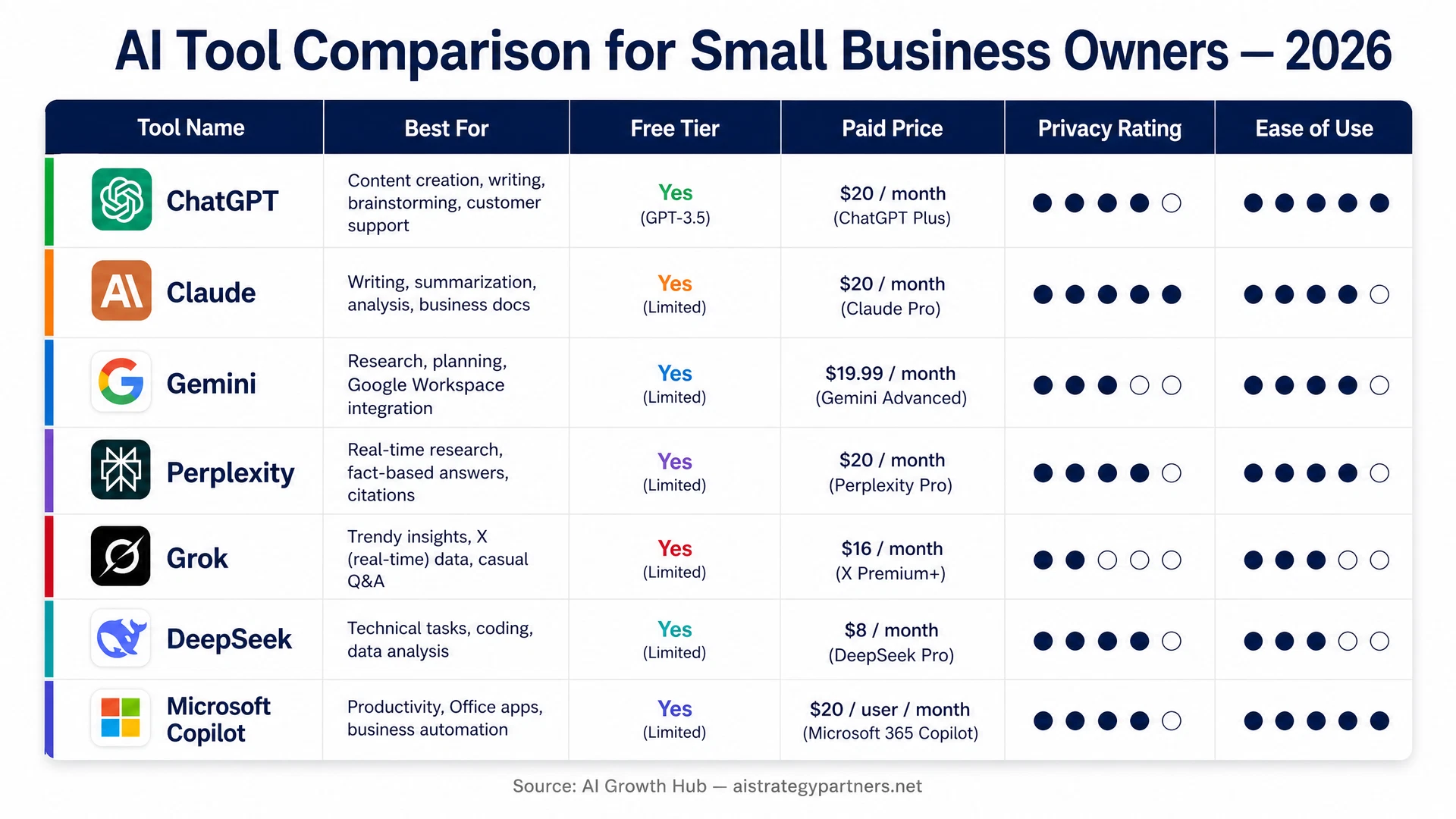
ChatGPT (OpenAI) — The Swiss Army Knife
ChatGPT is the most versatile AI tool available to small businesses. It handles writing, analysis, brainstorming, customer service drafts, spreadsheet help, coding assistance, and more. The ecosystem around it — plugins, integrations, custom GPTs — is the largest of any AI platform.
- Best for: Marketing content, email drafts, brainstorming, customer service scripts, general productivity
- Free tier: Yes — GPT-4o with usage limits
- Paid: ChatGPT Plus at $20/month | ChatGPT Team at $25/user/month (min 2 seats)
- Privacy: Business plans exclude your data from training by default
- Weakness: Can sound generic without good prompting; outputs need human editing
- Best fit: Marketing-focused businesses, content creators, general small business teams
Steve's take: ChatGPT is the right first tool for most small businesses. Start here, build your prompt library, then add specialized tools once you know what you actually need.
Claude (Anthropic) — The Document Specialist
Claude is built by Anthropic, an AI safety company, and it shows. Claude is more careful, more nuanced, and significantly better than ChatGPT at handling long documents, complex analysis, and careful business writing. It has a 1-million-token context window — meaning it can read and analyze an entire book in a single prompt.
- Best for: Proposals, contracts, financial summaries, long-document analysis, structured writing
- Free tier: Yes — Claude.ai with daily usage limits
- Paid: Claude Pro at $20/month | Claude Team at $25/user/month (min 5 seats)
- Privacy: API inputs not used for training by default; strong data handling policies
- Weakness: Smaller plugin ecosystem than ChatGPT; fewer integrations
- Best fit: Service businesses handling proposals, legal docs, financial reports, or complex client communications
Gemini (Google) — The Google Workspace Native
If your business runs on Google — Gmail, Docs, Sheets, Drive, Meet — Gemini is the most practical choice because it lives inside those tools natively. You don't need to copy and paste between apps. Gemini can summarize your emails, draft responses, analyze spreadsheets, and take meeting notes without ever leaving Google Workspace.
- Best for: Google Workspace teams, email management, Docs/Sheets automation, meeting summaries
- Free tier: Yes — Gemini app with Google account
- Paid: Google AI Pro at ~$20/month | Gemini for Workspace from $10/user/month
- Privacy: Enterprise plans exclude data from training; consumer plans less clear
- Weakness: Less refined for creative tasks; advantages concentrated inside Google ecosystem
- Best fit: Any business already using Google Workspace as their primary productivity suite
The Research Specialist: Perplexity AI
Perplexity is different from the Big 3 in one important way: it searches the live web before answering. While ChatGPT and Claude work from their training data (which has a knowledge cutoff), Perplexity pulls current information and cites its sources. For research, competitor analysis, market scans, and staying current on industry news, Perplexity is the best tool available.
- Best for: Market research, competitor analysis, industry news, fact-checking, sourced answers
- Free tier: Yes — generous free tier with web search
- Paid: Perplexity Pro at $20/month
- Privacy: Standard data practices; Pro plan has stronger controls
- Weakness: Not ideal for creative writing or document analysis
- Best fit: Any business that needs current, sourced information — especially for sales research, pricing checks, or industry monitoring
Use Perplexity as your 'second opinion' tool. When you need to verify a fact, research a prospect, or understand what competitors are charging, Perplexity gives you sourced, current answers that ChatGPT can't.
The Social Intelligence Tool: Grok (xAI)
Grok is built by Elon Musk's xAI company and has one unique advantage: real-time access to X (formerly Twitter) data. If your business needs to monitor trends, track what customers are saying about your industry, or stay on top of social conversations, Grok has a capability no other AI can match. Outside of social intelligence, it's a capable general assistant but not a top-tier choice for most small business workflows.
- Best for: Social media monitoring, trend tracking, real-time industry intelligence
- Free tier: Yes — basic Grok access with X account
- Paid: X Premium at $8/month includes Grok access | API pricing from $0.20/M tokens
- Privacy: xAI data practices; review before using for sensitive business data
- Weakness: Real-time social advantage requires API; less polished for document/writing tasks
- Best fit: Marketing teams, PR, businesses that need real-time social listening
The Chinese Models: DeepSeek and Qwen
DeepSeek and Qwen (by Alibaba) made headlines in early 2025 when they demonstrated performance comparable to GPT-4 at a fraction of the cost. They're real, capable AI tools — and they're free or nearly free to use. But there are important considerations for U.S. small businesses before adopting them.
DeepSeek — Powerful, Free, and Controversial
DeepSeek's R1 model matches or exceeds GPT-4 on reasoning and coding benchmarks, and it's free to use. The catch: DeepSeek is a Chinese company, and its data practices have raised concerns. The app has been banned on government devices in several countries. For sensitive business data — customer information, financial records, proprietary processes — the privacy risk is real and worth taking seriously.
- Best for: Coding assistance, reasoning tasks, cost-sensitive applications
- Free tier: Yes — DeepSeek.com is free
- Paid: API at $0.43/M input tokens (extremely cheap vs. OpenAI)
- Privacy: ⚠️ Chinese company; data stored on servers in China; not recommended for sensitive business data
- Self-hosted option: DeepSeek is open-weight — tech-savvy businesses can run it locally for full privacy
- Best fit: Technical tasks where you're not sharing sensitive data; developers who want cheap API access
Qwen (Alibaba) — Strong, Open, Similar Concerns
Qwen is Alibaba's AI model family. Like DeepSeek, it's highly capable, open-weight (meaning you can run it locally), and available at very low cost. Qwen 3.5 and 3.6 are Apache 2.0 licensed — free for commercial use with no usage caps when self-hosted. The same privacy concerns apply as with DeepSeek: the hosted version stores data on Chinese servers.
- Best for: Open-source deployments, cost-sensitive automation, self-hosted AI
- Free tier: Yes — Qwen.ai web interface
- Paid: API pricing competitive with DeepSeek
- Privacy: ⚠️ Same concerns as DeepSeek for hosted version; self-hosted is fully private
- Best fit: Businesses with technical capability to self-host who want maximum cost efficiency and data control
Our recommendation on Chinese models: If you're doing general research or non-sensitive tasks and want to save money, they're capable tools. If you're handling customer data, financial information, or anything proprietary — stick with U.S.-based providers.
The Microsoft Option: Copilot
Microsoft 365 Copilot is the AI layer built into Word, Excel, PowerPoint, Outlook, and Teams. If your business runs on Microsoft 365, Copilot is the most frictionless way to add AI — it lives inside the tools your team already uses every day. It's powered by OpenAI's models but integrated at the OS level in a way that standalone ChatGPT can't match.
- Best for: Microsoft 365 teams — Word documents, Excel analysis, PowerPoint decks, Outlook email management
- Free tier: Limited Copilot features included in Microsoft 365 plans
- Paid: Microsoft 365 Copilot at $30/user/month (requires Microsoft 365 Business subscription)
- Privacy: Enterprise-grade; data stays in your Microsoft tenant
- Weakness: Expensive; requires Microsoft 365; less flexible outside the Microsoft ecosystem
- Best fit: Businesses already paying for Microsoft 365 who want AI without switching tools
The Open-Source Option: Mistral and Llama
Meta's Llama 4 and Mistral's models are fully open-source — you can download the weights and run them on your own hardware. For businesses with technical capability and strong privacy requirements (healthcare, legal, financial services), self-hosted open-source models offer the strongest data protection: your data never leaves your own infrastructure.
- Best for: Privacy-sensitive industries, custom fine-tuning, self-hosted deployments
- Free tier: Free to download and run (requires hardware or cloud compute)
- Paid: Mistral API from $0.10/M tokens; Llama via AWS/Azure/Google Cloud
- Privacy: ✅ Maximum privacy when self-hosted — data never leaves your infrastructure
- Weakness: Requires technical setup; not plug-and-play for non-technical business owners
- Best fit: Healthcare practices, law firms, financial advisors, or any business handling sensitive regulated data
The Decision Framework: Which AI Is Right for You?
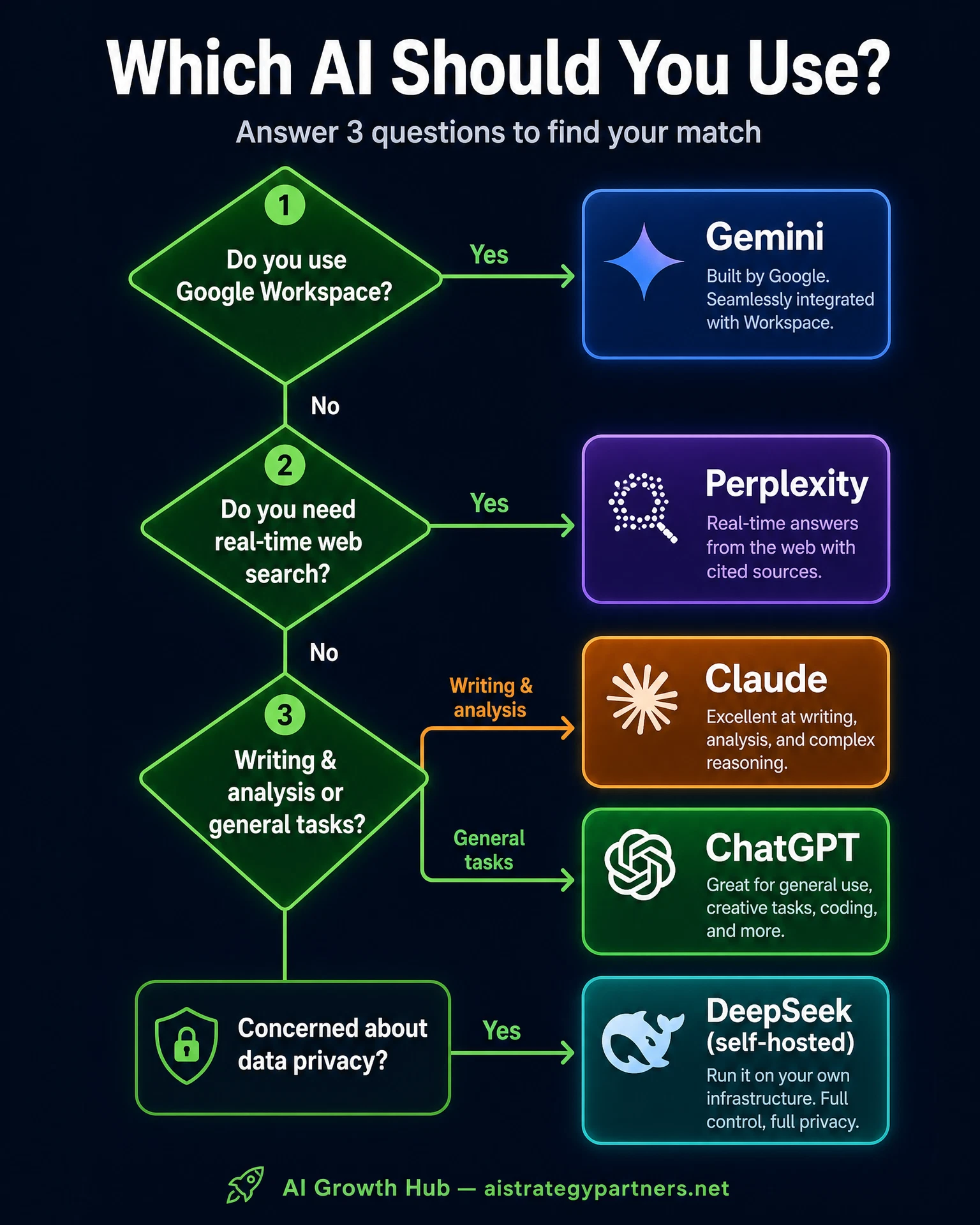
Here's how to cut through the noise and pick the right tool for your business in 5 minutes:
- 1Do you use Google Workspace (Gmail, Docs, Drive)? → Start with Gemini. The native integration alone is worth it.
- 2Do you use Microsoft 365 (Word, Excel, Outlook, Teams)? → Start with Microsoft 365 Copilot or ChatGPT Team.
- 3Do you write a lot of proposals, contracts, or long documents? → Start with Claude. It handles long-form analysis better than anything else.
- 4Do you need current information, competitor research, or sourced answers? → Add Perplexity (free tier is excellent).
- 5Do you need social media monitoring or trend tracking? → Add Grok.
- 6Are you in a privacy-sensitive industry (healthcare, legal, finance)? → Consider self-hosted Mistral or Llama.
- 7None of the above? → Start with ChatGPT Plus ($20/month). It handles 80% of small business AI needs.
Pricing Summary: What You'll Actually Pay
- ChatGPT Plus: $20/month per user | Team: $25/user/month (min 2 seats)
- Claude Pro: $20/month per user | Team: $25/user/month (min 5 seats)
- Gemini Advanced (Google AI Pro): ~$20/month | Workspace add-on from $10/user/month
- Perplexity Pro: $20/month | Free tier is genuinely useful
- Grok: Included with X Premium at $8/month
- Microsoft 365 Copilot: $30/user/month (requires Microsoft 365 subscription)
- DeepSeek: Free on web | API at ~$0.43/M tokens
- Qwen: Free on web | API competitive with DeepSeek
- Mistral/Llama: Free open-source | Infrastructure costs only when self-hosted
- Recommended starter stack: ChatGPT Plus + Perplexity free = $20/month total
Common Mistakes Small Business Owners Make with AI Tools
- Adopting too many tools at once — pick one, master it, then expand
- Copy-pasting AI output without editing — AI output is a draft, not a deliverable
- Choosing based on hype instead of workflow fit — the best tool is the one you'll use every day
- Ignoring privacy — don't paste customer data, financial records, or proprietary info into consumer AI tools
- Giving up after the first week — every AI tool has a 2-4 week learning curve before delivering real value
- Using AI for everything instead of the 2-3 tasks where it saves the most time
The Bottom Line for Small Business Owners
The AI tool landscape in 2026 is genuinely good for small businesses. You have access to the same underlying technology that Fortune 500 companies use — for $20/month or less. The question isn't whether to use AI. It's which tool to start with and what to use it for.
Our recommendation: Start with one tool. Use it for your highest-volume, most time-consuming task. Give it 30 days. Measure the time saved. Then decide whether to expand. The businesses that get the most value from AI aren't the ones with the most tools — they're the ones that use one tool really well.
If you want help figuring out which AI tools make the most sense for your specific business — and how to implement them so they actually produce results — that's exactly what AI Strategy Partners does. We've implemented AI systems for HVAC companies, plumbers, dental practices, law firms, and dozens of other service businesses. We know what works and what doesn't.
Frequently Asked Questions
Is ChatGPT the best AI for small business?
ChatGPT is the best all-around starting point for most small businesses because of its versatility and large ecosystem. However, Claude is better for document-heavy work, Gemini is better for Google Workspace teams, and Perplexity is better for research. The 'best' AI depends on your specific workflow.
Are free AI tools good enough for a small business?
Free tiers of ChatGPT, Claude, and Perplexity are functional starting points. Most businesses outgrow free tiers within 1-3 months of daily use due to usage caps and missing features. Start free to learn the tool, then upgrade when you hit the ceiling.
Is DeepSeek safe for business use?
DeepSeek is a capable AI tool but raises privacy concerns for U.S. businesses — it's a Chinese company and data is stored on servers in China. For non-sensitive tasks like general research or coding, the risk may be acceptable. For customer data, financial records, or proprietary business information, stick with U.S.-based providers like OpenAI, Anthropic, or Google.
How much does it cost to use AI for a small business?
A functional AI stack for a small business costs $20-60/month. The most common setup: ChatGPT Plus ($20/month) for general tasks + Perplexity free tier for research. If you need document analysis, swap ChatGPT for Claude ($20/month). If your team uses Google Workspace, Gemini is often included in your existing plan.
Should I use one AI tool or multiple?
Start with one. Most small businesses get the best results by mastering one general-purpose AI assistant before adding specialized tools. Once you're using your first tool daily and have built a prompt library, add a second tool for a specific workflow gap. Three tools is usually the maximum before returns diminish.
What's the difference between ChatGPT and an AI voice agent?
ChatGPT is a text-based AI assistant you interact with manually — you type a question, it responds. An AI voice agent is an automated system that answers your business phone, qualifies callers, and books appointments without any human involvement. They use similar underlying AI technology but serve completely different purposes. AI voice agents are what AI Strategy Partners installs for service businesses.
Want help choosing and implementing the right AI tools for your specific business? AI Strategy Partners has installed AI systems for HVAC companies, plumbers, dental practices, law firms, and more. Book a free 15-minute strategy call.
Book a Free Strategy Call